Best translation app for Mac in 2026: an honest 6-app roundup
May 30, 2026 · Kamban · Updated June 1, 2026
The teammate switches to Japanese. You scramble to Google Translate, paste a guess at what you heard, get back something that almost fits, and by the time you have it the call has moved two questions ahead. That is the Mac translation tax most people pay every week. This post is for picking the app that actually pays it down.
There is no single "best translation app for Mac." There is the best app for typing a sentence, the best app for getting a Zoom call in your own language, and the best app for keeping a client conversation off someone else's servers. Those are three different jobs. Below are six apps you can install on a Mac in 2026, scored across the four axes that matter.
How I scored each app
Four axes. No feature lists.
- Real-time voice. Can it translate audio you are hearing, or audio you are speaking, while the conversation is still happening? Captions count. Copy-paste does not.
- On-device. Does the audio or text leave your Mac? For client calls and private conversations, this is not a nice-to-have.
- Mac-native. Does it install like a Mac app, work across system audio, and stay out of the way? Browser extensions and "open a tab" web apps lose points here.
- Price. Per month, per year, or one-time. Free tools score well if they solve the problem.
No app wins every axis. The whole point of the roundup is to tell you which one fits which job.
Google Translate
The default. It is free, the web app is on every Mac, and the language coverage is enormous. For pasting a single sentence into a chat window, nothing is faster.
The honest weakness: there is no Mac app. You live in a browser tab. There is no system audio capture, so for a Zoom or YouTube moment you are stuck copying out what you think you heard. Your text goes to Google. For a tourist phrasebook moment, fine. For a client meeting, not fine.
- Real-time voice: weak. The mobile app has a Conversation mode, but on Mac you are in a browser.
- On-device: no.
- Mac-native: no.
- Price: free.
DeepL
Better than Google for German, French, and most European text. The desktop app is a real Mac app with a global shortcut (Cmd+C+C), and that shortcut is the reason a lot of writers and translators have it installed.
The honest weakness: it is still a text tool. There is no live system-audio capture on Mac. As u/Astalyos put it onr/googletranslate, "DeepL desktop is missing Romaji/furigana which make it difficult when you want to actually know how to read words and sentence." And in 2026 DeepL added AWS as a sub-processor and, by its own account, will no longer process data exclusively within Europe, which softens the "European, private" pitch that earned it the audience it has.
- Real-time voice: weak.
- On-device: no. Cloud, and no longer processed exclusively in the EU.
- Mac-native: yes, good app.
- Price: free tier, Pro from about $9 per month.
Otter.ai
Best in class for English meeting notes. If you live in Zoom and Google Meet and everyone is speaking English, Otter is hard to beat for transcript quality and searchable history.
The honest weakness: it is English-first and English-best. The moment a meeting leaves English the experience degrades fast. A podcaster on r/podcasting summed it up: "Otter.ai doesn't support Czech at all, eliminated immediately." And on r/ios, u/xodac explicitly disqualified it for business meetings "in foreign languages, so unfortunately Otter.AI wont work."
Translation is not the product. Transcription is.
If you are weighing Otter specifically for translation rather than English notes, I go deeper in the VoiceLeap vs Otter.ai comparison.
- Real-time voice: partial. Captions, yes. Voice back, no.
- On-device: no.
- Mac-native: web and Zoom integration. No native Mac app you live in.
- Price: free tier with 300 minutes a month; Pro from $16.99 per month.
Apple Translate
Built into macOS. Free. Runs on-device. It will translate a selection in Safari, a sentence you type, and audio you record into the Translate app.
The honest weakness: there is no system-audio capture and no live "play it back" for what is happening in another window. It is a sentence translator with a Conversation mode that needs both speakers to point a phone at each other. It does not solve the Zoom problem. As u/Final_Alps asked on r/BuyFromEU, even people happy with Apple's stack still ask, "what is the currently recommended translator app for the apple devices? I am ok to pay some money."
- Real-time voice: weak for streaming audio.
- On-device: yes.
- Mac-native: yes, the most native of any option.
- Price: free.
Reverso
The one to install when you care whether a phrase is how a native speaker would say it. Reverso shows real example sentences from books, films, and parliamentary transcripts. For language learners, professional writers, and people drafting emails in a second language, that context is the product.
The honest weakness: it is a study and reference tool, not a meeting tool. There is a Mac app, but no live audio capture, no system-audio routing, and the free tier nags. If you want to understand a Japanese podcast in real time, Reverso is the wrong shape.
- Real-time voice: no.
- On-device: no.
- Mac-native: yes, basic Mac app.
- Price: free tier with limits; Premium from about $7 per month.
VoiceLeap
This is the app I build, so take the framing with the appropriate grain of salt. VoiceLeap translates any audio playing on your Mac, and audio from your mic, into the language you choose, and plays the translation back almost instantly. It runs on-device on Apple Silicon using built-in macOS intelligence. No cloud, no servers, no audio leaves the Mac.
What it is good for: Zoom and Teams meetings where the other side is in Japanese or Spanish, YouTube videos and podcasts in a language you do not speak, and presenting back to a foreign team through a virtual mic. Listen mode, Speak mode, Conversation mode. Ten major languages, thirty-plus regional locales.
The honest weakness: VoiceLeap is built around voice. For pasting a sentence into a chat window, DeepL or Apple Translate are faster. For looking up whether a phrase is idiomatic, Reverso is better. And it needs macOS 26.2 or later on Apple Silicon. Intel Macs are not supported.
- Real-time voice: strong.
- On-device: yes.
- Mac-native: yes.
- Price: $29 per year early-bird, $49 lifetime early-bird, 7-day free trial with every feature unlocked and no credit card.
The honest scorecard
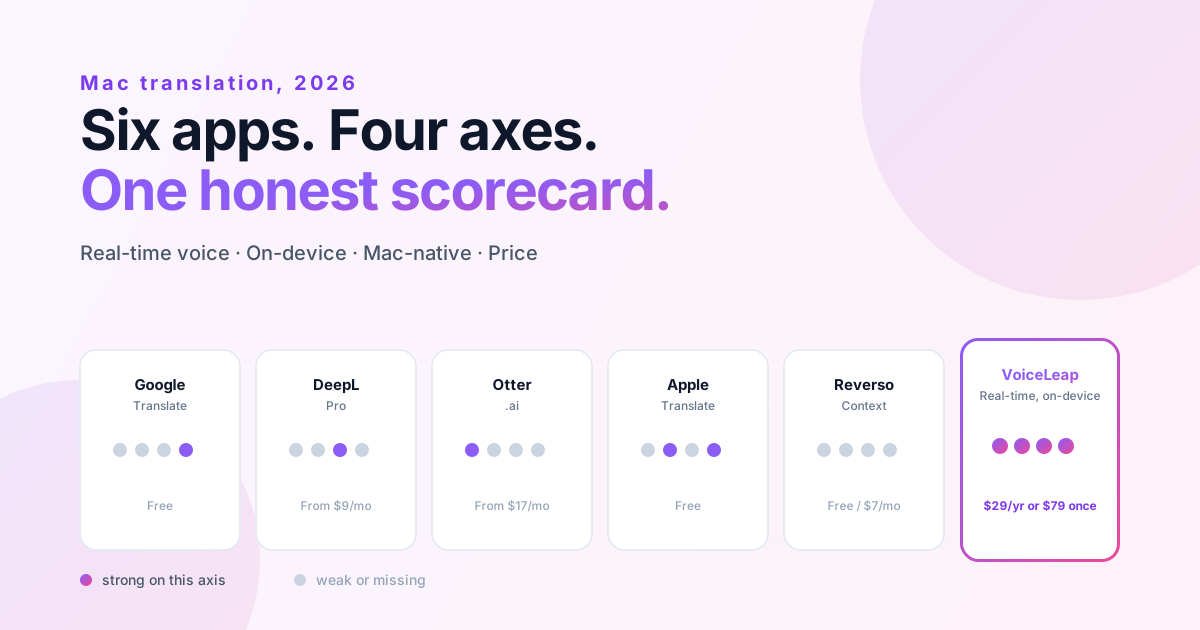
| App | Real-time voice | On-device | Mac-native | Price |
|---|---|---|---|---|
| Google Translate | Weak | No | No | Free |
| DeepL | Weak | No | Yes | Free / ~$9 mo |
| Otter.ai | Partial (English) | No | Partial | Free / $16.99 mo |
| Apple Translate | Weak (no system audio) | Yes | Yes | Free |
| Reverso | No | No | Yes | Free / ~$7 mo |
| VoiceLeap | Strong | Yes | Yes | $29 yr / $49 lifetime |
No app wins every column. That is the point.
Which one should you actually install?
- You need to paste a sentence: Google Translate or Apple Translate. Both free, both done.
- You write or read a lot of European-language text: DeepL.
- You want good notes from English-only meetings: Otter.
- You are a language learner double-checking idioms: Reverso.
- You want to stop muting Zoom to copy-paste what someone just said in Japanese: VoiceLeap.
- You handle private or client audio and the recording cannot leave your Mac: VoiceLeap or Apple Translate, depending on whether you need live streaming or one sentence at a time.
If the Zoom case is the one breaking your week, VoiceLeap is the one in this list built for it. Seven-day free trial, every feature unlocked, no card. Download VoiceLeap. macOS 26.2 or later, Apple Silicon only.
Frequently asked questions
What is the best free translation app for Mac?
For typing or pasting a sentence, Apple Translate is built into macOS, runs on-device, and costs nothing. Google Translate is the other free default, though on Mac it lives in a browser tab with no system-audio capture. Both are great for text and weak for live audio.
Can I translate a Zoom or Teams call in real time on a Mac?
Most translation tools cannot, because they have no way to capture the audio coming out of your Mac. VoiceLeap captures system audio and your mic, translates on-device, and can route the translation into Zoom, Google Meet, or Teams through a virtual microphone. It needs macOS 26.2 or later on Apple Silicon.
Is there an offline, on-device translation app for Mac?
Yes. Apple Translate runs on-device for sentences and short recordings. VoiceLeap runs on-device for live voice across ten languages using built-in macOS intelligence, so no audio leaves your Mac. For private or client calls, on-device is the feature that matters most.
What is the best Mac app to translate YouTube videos or podcasts?
You need an app that can translate the audio your Mac is playing, not just text you paste. VoiceLeap's Listen mode translates any system audio, including YouTube, podcasts, Netflix, and Spotify, and plays the translation back almost instantly.
Do DeepL and Otter work for foreign-language meetings on Mac?
Not really. DeepL is an excellent text tool but has no live system-audio capture on Mac. Otter is English-first transcription, so the experience degrades the moment a meeting leaves English. For a live foreign-language meeting, neither is built for the job.