Early Access

Don't learn languages,
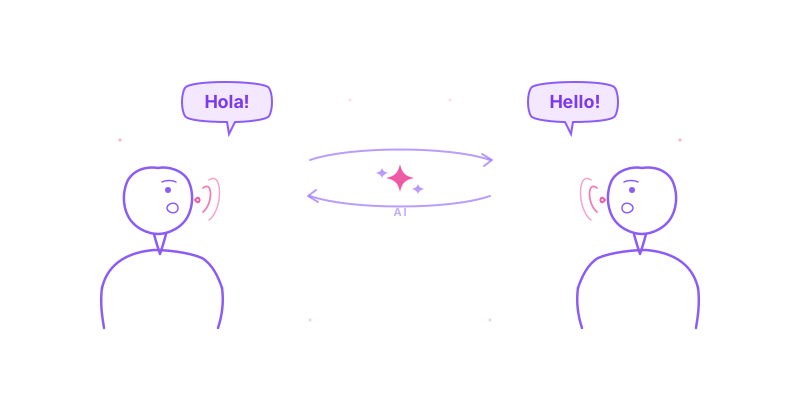
just speak them.

Real-time voice-to-voice translation for any app on your Mac. Understand foreign audio instantly. Be understood in any language.

Voice-to-voice translation — speak in any language, hear in yours

100% on-device. Translation happens entirely on your Mac.

No cloud. No servers. No data collection.

Download for macOS · Free for 7 days

7-day free trial · All features included · No credit card required

macOS 26.2+ · Apple Silicon · 10 languages · 30+ dialects

By downloading, you agree to our Terms of Service

Fluent in 10 major languages

English, Japanese, Chinese (Mandarin & Cantonese), Korean, Spanish, French, German, Portuguese, and Italian — with regional accuracy.

Works with every app you already use

Zoom Zoom
Google Meet Google Meet
Microsoft Teams Teams
YouTube YouTube
Slack Slack
VLC VLC
Spotify Spotify
Netflix Netflix

The Problem

Language barriers cost you opportunities.

You skip the Japanese podcast everyone's talking about. You stay quiet in multilingual meetings. You miss what your international colleagues actually mean.

Translation apps exist, but they break your flow. Copy, paste, wait, switch tabs, repeat.

VoiceLeap works invisibly, across your entire Mac.

How It Works

Three ways to break through.

Listen

Listen

Understand anyone

Watch YouTube in Japanese. Join meetings in Korean. Listen to podcasts in Spanish. VoiceLeap captures any audio on your Mac and translates it in real-time.

Choose your experience:

  • Subtitles only — see translations while hearing the original
  • Full translation — hear everything in your language
Speak

Speak

Be understood by everyone

Present to a Japanese team. Teach international students. Broadcast to foreign viewers. Speak naturally in your language — they hear you in theirs.

Output options:

  • Natural AI voice — clear, professional output
  • Virtual microphone — route to Zoom, Meet, Teams
Conversation

Conversation

Two-way, real-time

True multilingual meetings. You speak English, they hear Japanese. They speak Japanese, you hear English. No interpreters. No delays. Just conversation.

Perfect for:

  • International team calls
  • Client meetings across languages
  • Interviews with global candidates

Features

Everything happens locally.

🔒

Private by default

All translation runs on-device using macOS built-in intelligence. Your conversations never leave your Mac.

Real-time performance

Low latency. Fast enough that conversation feels natural.

🌍

10 languages, 30+ locales

English, Japanese, Chinese (Mandarin & Cantonese), Korean, Spanish, French, German, Portuguese, and Italian — with regional accuracy.

🎯

Works everywhere

Any app that plays audio. Zoom, Meet, Teams, YouTube, VLC, Netflix — if you can hear it, VoiceLeap can translate it.

Pricing

Simple. Generous. Fair.

Try every feature free for 7 days. No credit card required.

Early Bird

Standard

$49 $29/year

Launch pricing

  • Listen mode — understand anyone
  • Speak mode — speak to foreign audiences
  • Conversation mode — two-way translation
  • 10 languages (30+ locales)
  • Unlimited transcript history
Start 7-Day Free Trial

No credit card required · Terms

Early Bird

Standard Lifetime

$129 $79 once

Launch pricing

  • Everything in Standard
  • Lifetime updates included
  • No recurring fees
  • Support the indie developer
Start 7-Day Free Trial

No credit card required · Terms

FAQ

Questions? Answered.

How is this different from Google Translate?

VoiceLeap works system-wide in real-time. No copy-pasting. No tab switching. It translates audio as it plays, across any app on your Mac.

Is my audio sent to the cloud?

No. All speech recognition and translation happens locally on your Mac using built-in macOS intelligence. Your conversations stay private.

How many languages does VoiceLeap support?

VoiceLeap currently supports 10 major languages with 30+ regional locales, all processed locally on your Mac. More languages will be added in the future.

Which Macs are supported?

Any Mac with Apple Silicon (M1 or later) running macOS 26.2+. Intel Macs are not supported due to on-device AI requirements.

Can I use it for live meetings?

Yes. VoiceLeap creates a virtual microphone that Zoom, Meet, and Teams recognize as your input device. You speak English, they receive Japanese (or any supported language).

How does the free trial work?

Download VoiceLeap and get full access to every feature for 7 days — all modes, all languages, no limits. No credit card required. After the trial, choose Standard ($29/year) or Lifetime ($79 once) to keep using VoiceLeap.

What's the difference between Standard and Standard Lifetime?

Both plans include the exact same features — unlimited translation, all modes, all languages. The only difference is billing: Standard is $29/year, Standard Lifetime is a one-time $79 payment with free updates forever.

Your Mac, now fluent in 10 major languages.

Download VoiceLeap and start translating in under a minute.

Start Free Trial · 7 days free

macOS 26.2+ · Apple Silicon · All features included

By downloading, you agree to our Terms of Service and Privacy Policy