Apple Live Translation on Mac: where it works and where it stops
September 16, 2026 · Kamban
You updated macOS, turned on Apple Intelligence, and saw Live Translation in the feature list. Then Monday's call starts in Zoom, half the room switches to Japanese, and nothing happens. No captions. No voice. Your Mac is exactly as monolingual as it was last week.
You are not doing it wrong. Live Translation is a feature of three apps, not a feature of your Mac. One person on r/MacOS who lives in Italy and sits through meetings in Italian put the wish plainly: understanding the context "could be very helpful if it can be done through MacOS!" A reply in the same thread said it can't be done natively.
Here is what Apple's feature does on a Mac, how to turn it on, where it stops, and what to use for everything else.
What Apple Live Translation does on a Mac
Live Translation is part of Apple Intelligence. On a Mac it needs three things:
- An Apple Silicon Mac (M1 or later)
- macOS Tahoe 26 or later
- Apple Intelligence turned on in System Settings
Apple's translation models run on-device, so the conversation stays on your Mac. The feature lives inside three Apple apps, and each one gives you a different kind of output:
| App | What you get |
|---|---|
| Messages | Incoming texts translated into your language, and your replies translated back |
| FaceTime | Translated live captions on screen while you still hear the other person's voice |
| Phone | The translation spoken out loud as each person talks |
That last row matters. Only the Phone app speaks the translation. FaceTime gives you captions, so you are reading while someone talks.
How to turn on Live Translation in Messages, FaceTime, and Phone
Once Apple Intelligence is on, there is no master switch. You start it inside each app, and macOS may ask you to download a language the first time.
In Messages
- Open a conversation with someone writing in another language.
- Click Translate from [language] at the top of the chat.
- To make it stick, click the contact's name and turn on Automatically Translate.
In FaceTime
- Start a one-on-one FaceTime call.
- Click the More button during the call.
- Choose Live Captions to see translated captions.
In the Phone app
- Start or answer a call in the Phone app on your Mac.
- Click the More button, then choose Live Translation.
- Pick the caller's language and yours, then click Start Translation.
Apple keeps the current steps and supported languages on its Translate messages and calls on Mac support page. Check it if a menu item is missing.
Where Live Translation stops
For texting a friend abroad or calling a hotel, Apple's feature is good and free. The trouble starts with everything else you do on a Mac.
It does not work in Zoom, Google Meet, or Microsoft Teams. Live Translation only listens inside Messages, FaceTime, and Phone. Your work calls happen somewhere else. On r/ios, u/WangtaWang summed up the wish: "Hoping Apple allows this feature to tap into other apps for translation services?"
It does not translate what your Mac is playing. A Japanese YouTube video, a Spanish podcast, a Korean show on Netflix, a webinar in German. None of that audio passes through the three apps, so none of it gets translated.
FaceTime gives you captions, not a voice. That sounds minor until you sit through an hour of it. As u/ferrisbuller24 wrote on r/Zoom about caption-based tools: "You have to read AND listen which is exhausting."
It is built for one-on-one. Apple's FaceTime translation is designed for a conversation between two people. A team call with five speakers is a different problem.
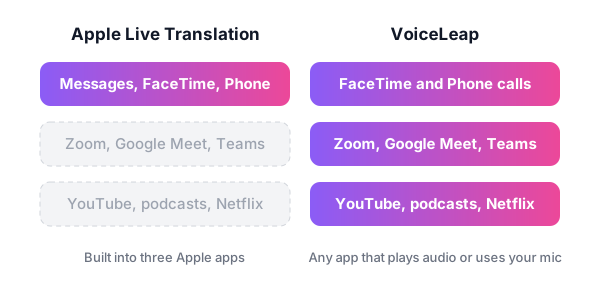
None of this is a bug. Apple built Live Translation for personal conversations inside its own apps. If most of your foreign-language moments happen in Zoom or a browser tab, you need something that works at the level of your Mac's audio.
How to translate the rest of your Mac
That gap is why we built VoiceLeap. It runs on the same kind of Mac Apple's feature needs, an Apple Silicon Mac on macOS 26.2 or later, and it also translates on-device. The difference is where it listens. VoiceLeap works with any app that plays audio or uses your mic.
It has three modes:
- Listen. VoiceLeap translates any audio your Mac plays and speaks it back in your language, a beat behind the speaker. That covers a Zoom call where everyone else speaks Japanese, a YouTube video, a podcast, or Netflix. More on this in how to translate YouTube videos on a Mac.
- Speak. You talk in English and the other side hears Japanese, Spanish, or French. A virtual mic sends your translated voice into Zoom, Google Meet, or Teams, so nobody else installs anything. See how Zoom translation works with VoiceLeap.
- Conversation. Two-way live translation. You hear them in English, they hear you in their language.
It covers 10 languages, including Japanese, Chinese (Mandarin and Cantonese), Korean, Spanish, French, German, Portuguese, and Italian. Because it runs on-device, your meeting audio stays on your Mac instead of going to a cloud service.
Your meeting stays the same too. No bot joins the call, and no one has to set up an interpreter channel.
Which one to use when
You do not have to pick one. Apple's feature is already on your Mac, so keep it for what it does well.
| Situation | Use |
|---|---|
| Texting someone in another language | Apple Live Translation in Messages |
| FaceTime call with one person | Apple Live Translation (captions) |
| Phone call from your Mac | Apple Live Translation (spoken) |
| Zoom, Google Meet, or Teams meeting | VoiceLeap Listen or Conversation |
| Presenting to a team that speaks another language | VoiceLeap Speak |
| YouTube, podcasts, Netflix | VoiceLeap Listen |
If you want to see how VoiceLeap compares with Google Translate, DeepL, Otter, and Apple's own Translate app, read our roundup of the best translation apps for Mac.
Try it on your next call
Leave Live Translation on for Messages and calls. For your next Zoom meeting or foreign-language video, download VoiceLeap and try it free for 7 days with every feature included and no credit card. After that it is $29 a year or $49 once. See pricing.
Frequently asked questions
Is there an Apple Translate app for Mac?
Yes. The Translate app is built into macOS and translates text you type or paste. Live Translation is a separate Apple Intelligence feature that works inside Messages, FaceTime, and the Phone app. Neither one translates audio playing in other apps like Zoom or YouTube.
Does Apple Live Translation work in Zoom or Microsoft Teams?
No. On a Mac, Apple Live Translation only works in Messages, FaceTime, and Phone. To translate a Zoom, Google Meet, or Teams call, you need an app that captures your Mac's audio, such as VoiceLeap, which translates on-device and can send your translated voice into the meeting.
Does AirPods Live Translation work with a Mac?
Apple built AirPods Live Translation for in-person conversations, started from AirPods connected to a supported iPhone. On a Mac, Live Translation lives in Messages, FaceTime, and Phone instead. For live voice translation of any app on your Mac, use a system-audio app like VoiceLeap.
Is Apple Live Translation free and private?
Yes. It is included with Apple Intelligence at no extra cost, and Apple says the translation runs on-device. It needs an Apple Silicon Mac with Apple Intelligence turned on.
Why don't I see Live Translation on my Mac?
Check three things: you have an Apple Silicon Mac, you are on macOS Tahoe 26 or later, and Apple Intelligence is turned on. Some Apple Intelligence features are also limited by region and language, so your language pair may not be supported yet.